For most Melbourne SMEs, co-managed IT cost sits between $55 and $140 per user per month, with the average mid-market quote landing around $85-$110 per user. Hourly retainers usually run $180-$260 per hour. The spread comes down to tooling, security stack, and how much after-hours cover you actually need.
That’s the short answer. The longer answer is where the money actually goes, what’s quietly missing from cheap quotes, and how to read an MSP proposal without getting stitched up. This post walks through real AUD pricing for co-managed IT in Australia, the three pricing models you’ll see quoted, and the variables that genuinely move the number up or down.
The Three Co-Managed Pricing Models You’ll See Quoted
Australian MSPs essentially use three structures for co-managed IT. Most quotes you receive will be a variant of one of these.
1. Per-User Fixed Monthly
This is the model TechAssist uses, and it’s where the market is heading. You pay a flat monthly fee per active user, usually anyone with a corporate email or device. Includes a defined scope of work: monitoring, patching, helpdesk, security stack, vendor liaison.
Typical Melbourne range: $55-$140 per user per month, depending on what’s bundled.
Why it’s becoming standard: budgeting is predictable, and incentives align, the MSP doesn’t earn more when things break, they earn more when you grow. It also scales cleanly through onboarding/offboarding cycles.
2. Per-Device
Common with older MSPs and infrastructure-heavy environments. You pay per endpoint: workstations $35-$70/month, servers $150-$350/month, network devices $25-$80/month each.
It can work out cheaper if your staff share devices (warehouse, retail, shift work), but it gets messy quickly. Users on multiple devices, mobile-heavy workforces, and BYOD all distort the maths. Most knowledge-work SMEs pay more under per-device than per-user once you total it up honestly.
3. Hourly Retainer / Block Hours
You buy a block of hours per month (say 20, 40, 60) at a discounted rate. Standard hourly rates in Melbourne sit at $180-$260/hour, with retainers typically discounting that 10-20%.
Suits businesses with a strong internal IT team who only need escalation, project work, or vendor management. The catch: when something goes wrong, you’re watching the clock burn. It also doesn’t include 24/7 monitoring or automated patching unless those are layered on separately, which they almost always need to be.
What Drives the Per-User Number Up or Down
If two MSPs quote you $65 and $115 per user for “co-managed IT”, they’re not selling the same product. Here’s what actually moves the number.
The Security Stack
This is the biggest variable in 2026. A baseline co-managed quote with Microsoft Defender, basic MFA, and standard email filtering will sit at the lower end ($55-$75 per user). Add EDR/XDR (CrowdStrike, SentinelOne, Defender for Business Premium), DNS filtering, advanced phishing protection, dark web monitoring, and a SIEM, and you’re at $95-$130 per user before anything else.
Hours of Cover
Business hours only (8am-6pm) is the cheap option. Extended hours (7am-9pm) adds roughly $8-$15 per user. True 24/7 with on-call engineers, like TechAssist’s NOC at Tecoma, adds $15-$25 per user but matters enormously when ransomware hits at 2am on a Sunday.
Compliance Requirements
Essential 8 Maturity Level 1 adds $5-$12 per user in tooling and reporting overhead. Maturity Level 2 adds $15-$25. ISO 27001-aligned environments, common in legal, financial services, and government supply chain, typically run $25-$40 per user over baseline. This isn’t optional padding; it’s audit logging, immutable backups, application allowlisting, and the engineering hours to maintain them.
Project Work
Co-managed contracts usually exclude project work: migrations, office fit-outs, major upgrades. This is generally billed at $180-$240 per hour or as a fixed-price scope. If your MSP quietly includes “5 hours of project work per month”, it’s already priced in and you’re paying for it whether you use it.
Realistic Pricing Comparison: What You’re Actually Buying
The table below reflects current Melbourne SME pricing as of mid-2026. These are per-user-per-month figures for organisations of 30-150 staff.
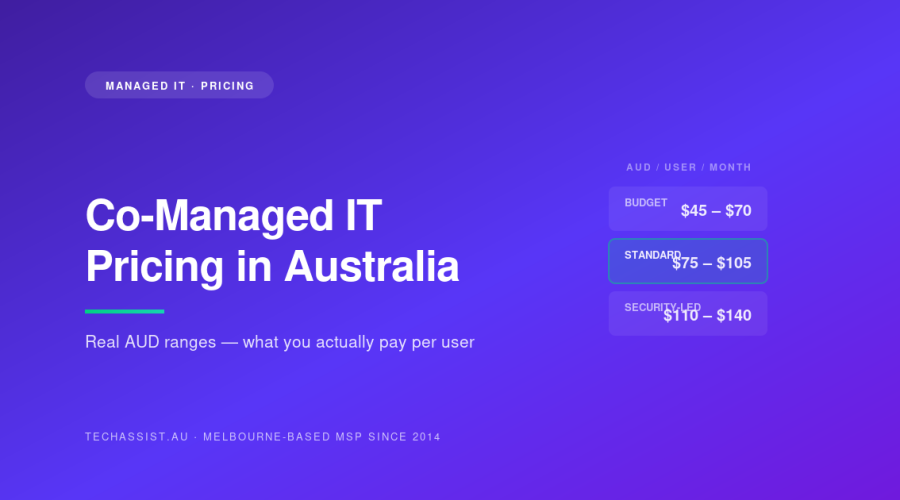
| Tier | Price Range (AUD/user/month) | What’s Included | Best Fit |
|---|---|---|---|
| Budget Co-Managed | $45-$70 | Basic helpdesk (business hours), patching, antivirus, standard backups | Low-risk businesses, non-regulated, internal IT carries most load |
| Standard Co-Managed | $75-$105 | Extended hours helpdesk, EDR, MFA, M365 management, monthly reporting, vendor liaison | Most professional services SMEs, 30-100 staff |
| Security-Led Co-Managed | $110-$140 | NOC with 24/7 on-call and emergency support, full EDR/XDR, SIEM, Essential 8 ML1-2, monthly security reviews, dark web monitoring | Legal, finance, healthcare, government supply chain |
| Fully Managed (for comparison) | $140-$220 | Everything above plus full ownership: no internal IT required | SMEs without internal IT capability |
For context on where co-managed sits structurally compared to other models, see our breakdown of co-managed vs fully managed vs internal-only IT.
What’s IN Scope vs OUT of Scope (and the Hidden Costs)
This is where ugly surprises live. A clear scope document should explicitly list both sides. If yours doesn’t, push back before signing.
Typically IN Scope
- Helpdesk tickets within stated hours
- Monitoring and alerting on covered devices
- OS and third-party patching
- Antivirus/EDR management
- Backup monitoring (not restoration drama)
- M365 / Google Workspace administration
- Vendor liaison with ISPs, software vendors
- Monthly reporting
Typically OUT of Scope (Charged Separately)
- Hardware purchases and replacement
- Software licences (M365, security tools, usually pass-through at cost or +10%)
- Major projects (migrations, fit-outs, server replacement)
- Onsite visits beyond a stated allowance
- After-hours work outside contracted cover
- Data recovery from non-backed-up systems
- Training delivery
The Hidden Costs That Catch People
Three recurring ones:
Onboarding fees. Some MSPs charge a one-off discovery and onboarding fee of $3,000-$15,000 depending on environment complexity. This is reasonable for the documentation and tooling rollout work involved, but it should be on the quote, not sprung after signature.
Licence mark-ups. M365 and security tool licences are often resold. A 5-10% mark-up is industry standard. A 25-40% mark-up is gouging. Ask explicitly what the mark-up is.
“Per-incident” fees on top of the monthly. Some cheaper contracts charge per ticket or per hour over a baseline. You think you’re paying $55/user, you’re actually paying $55 plus whatever your team rings up that month. Compare total cost of ownership, not headline rates.
How Pricing Scales With Security and Compliance
This catches a lot of SMEs off-guard. The same 80-user business can have wildly different co-managed pricing depending on what regulators or insurers require.
A general professional services firm with no compliance obligations: $75-$95 per user is fair.
The same firm needs Essential 8 ML1 because they’re tendering for state government work: add $5-$12 per user.
They win a federal contract requiring Essential 8 ML2: add another $10-$15.
They go for ISO 27001 to win enterprise clients: add $20-$30 more per user, plus a one-off implementation cost of $40,000-$120,000.
That same 80-user business has gone from $6,000/month to over $14,000/month, and the MSP isn’t ripping them off. The work, tooling, and audit overhead is genuinely that much greater.
Co-Managed vs Fully Managed: The Real Price Difference
People assume co-managed is significantly cheaper than fully managed because you’re keeping internal IT. The actual gap is smaller than expected, usually 25-40%, not 60-70%.
Why? Because the expensive parts of fully managed IT, the security stack, 24/7 monitoring, tooling licences, NOC infrastructure, don’t get cheaper just because you have an internal sysadmin. The MSP still runs the same RMM, the same EDR, the same SIEM. What you save is the helpdesk volume and Tier 1/2 work that your internal team absorbs.
A realistic comparison for an 80-user Melbourne business:
| Model | Monthly Cost | Annual Cost | Plus Internal IT Cost | Total Annual IT Spend |
|---|---|---|---|---|
| Fully Managed (no internal IT) | $13,600 | $163,200 | $0 | $163,200 |
| Co-Managed (1 internal sysadmin) | $8,800 | $105,600 | $130,000 (salary + on-costs) | $235,600 |
| Internal Only (1 sysadmin + 1 helpdesk) | $0 (managed fees) | $0 | $210,000 + ~$60,000 tooling | $270,000 |
Co-managed almost never beats fully managed on raw cost. It wins on control, institutional knowledge, faster internal response, and the ability to scale internal capability over time. We’ve covered this in more depth in why Melbourne SMEs choose co-managed over the other models.
What Cheap Co-Managed Actually Means
When someone quotes you $45/user for “full co-managed IT support”, something has to give. Here’s what it usually is.
Junior Techs Doing Senior Work
Cheap MSPs run lean on senior engineering. Your tickets get handled by Tier 1 staff who escalate slowly because escalation is expensive for the MSP. Complex issues sit in queue. By contrast, TechAssist runs 13 Melbourne-employed staff with proper Tier 2/3 depth, you get the right person on the ticket, not the only person available.
Tooling Cuts
Real RMM, EDR, SIEM, and backup tooling costs the MSP $25-$50 per endpoint per month in licences before they’ve done any work. When the quote is $45/user, the maths doesn’t add up unless they’re using thin tooling: usually a basic RMM, free-tier antivirus, and no SIEM. You’re paying for monitoring that doesn’t actually monitor.
No Real After-Hours
“24/7 support” at the cheap end usually means a voicemail that gets actioned next business day. Compare that to a real NOC with engineers on shift. TechAssist’s NOC operates 24/7 from Tecoma, with 15-minute average response on Priority 1 tickets and clearly published SLA terms.
Offshore Helpdesk
Nothing inherently wrong with offshore, but it’s almost always cheaper because of labour costs, not better service. If you’re paying $50/user, your tickets are probably being handled in Manila or Cebu. Fine for password resets. Not fine when your file server is down and the engineer can’t access your network without three hours of permission escalation.
Concrete Example: A 70-Staff Law Firm in South Yarra
A Melbourne law firm we worked with had been paying a cheap MSP $4,200/month ($60/user) for “fully managed IT”. They had one internal IT manager who’d inherited the relationship.
The reality:
- EDR licences they were “paying for” turned out to be a free antivirus, white-labelled
- Backups hadn’t been test-restored in 14 months
- Three sets of dormant admin credentials still active from former staff
- MFA only on email, not on the practice management system or VPN
- “24/7 support” took 6 hours to acknowledge a Saturday outage
We moved them to a co-managed arrangement at $96/user/month ($6,720/month) including proper EDR, M365 Business Premium management, NOC with 24/7 on-call and emergency support cover, Essential 8 ML1 reporting, and monthly security reviews. Their internal IT manager kept ownership of strategy and user-facing work; we picked up monitoring, security, escalations, and after-hours.
Headline price went up 60%. Total IT risk went down by an order of magnitude, and their professional indemnity insurer dropped their premium by $11,000/year because of the improved security posture. Net annual cost increase: roughly $19,000. Worth every cent compared to the ransomware claim they were one bad click away from.
How to Read a Co-Managed Quote Honestly
Five questions to ask every MSP quoting you:
- What’s the exact tooling stack (RMM, EDR, backup, SIEM) and what does it cost you in licences per endpoint?
- What are the response SLAs in writing, and what penalties apply if you miss them?
- Where are your helpdesk staff based, and what hours do they work?
- What’s onboarding cost, what’s project work charged at, and what’s the licence mark-up?
- Will you provide three reference clients of similar size and industry?
An MSP that can’t answer these crisply isn’t being deliberately evasive: they probably don’t know. That’s its own answer.
FAQ
Is co-managed IT cheaper than hiring more internal staff?
Usually yes, until you reach about 200-250 staff. A single mid-level sysadmin in Melbourne costs $110-$140k base plus 20-25% in on-costs and tooling. For under $9,000/month, a co-managed arrangement gives you a full engineering team, 24/7 monitoring, and proper security tooling. Past 200 staff, the maths shifts and a larger internal team with selective external support tends to win.
Why do MSP quotes vary so much for the same number of users?
Because “co-managed IT” isn’t a defined product. Two MSPs at $65 and $115 per user are selling fundamentally different things: different tooling stacks, different security depth, different cover hours, different escalation paths. Compare scope line-by-line, not headline price.
Can we start small and add services later?
Yes. Most MSPs (including us) will start you on a base tier and layer in EDR, 24/7 cover, or compliance work as you need it. The cleaner approach is to define what you actually need upfront with a proper discovery, but staged adoption works fine if budget is the constraint.
What’s a fair onboarding fee for a 50-100 user environment?
$5,000-$12,000 depending on documentation state and tooling rollout. Less than $3,000 usually means corners are being cut on discovery. More than $20,000 needs a very clear breakdown of what’s included.
How long should a co-managed contract be?
12 months is standard. Some MSPs push 24-36 month terms for discounts: read the exit clauses carefully. A confident MSP will offer month-to-month after the initial 12, because they don’t need to lock you in.
The Bluntly Honest Summary
Co-managed IT cost in Melbourne lands at $75-$110 per user for most professional services SMEs, climbs to $110-$140 with serious security and compliance, and drops to $45-$70 only if you’re willing to accept thinner tooling and slower response. Anyone quoting outside those ranges should justify exactly why.
The headline rate is the least interesting number on the quote. What matters is the tooling stack, the response SLAs in writing, who actually picks up the phone at 11pm, and what’s hiding in the “out of scope” column. Get those four right and the per-user number will fall where it should.
If you’d like a straight breakdown of what a co-managed arrangement would cost for your specific environment, no sales theatre, just numbers, have a chat with us. You can also read more about how our co-managed model works, or how we approach managed IT services across Melbourne.