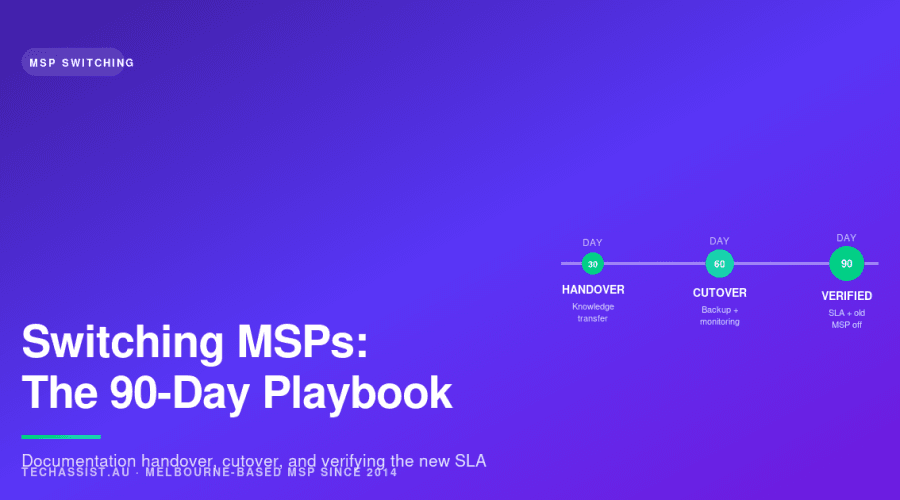
Switching MSPs is a documentation problem dressed up as a technical one. Get the paperwork right in the first three weeks and the cutover is uneventful. Get it wrong and you’ll spend month two chasing passwords. This is the 90-day playbook we use when onboarding Melbourne SMEs leaving another provider.
The post assumes you’ve already made the call. You’re not weighing up how to choose an MSP in Melbourne, you’ve chosen. What you need now is execution: a sequence of decisions and handover tasks that gets you out of the old contract cleanly and into the new one with your data, your tenant control and your sanity intact.
The three decisions you settle before day zero
Most failed MSP migrations fail before they start, because the incoming provider was handed a vague brief and the outgoing one was given a vague deadline. Settle these three things in writing before the 90-day clock begins.
1. What’s in scope and what isn’t
Re-scope from scratch. Don’t inherit your old MSP’s scope document, it was almost certainly written to suit their staffing, not your needs. Walk through every endpoint, every server, every SaaS tenant, every printer, every meeting room, every shadow-IT app the finance team has been quietly paying for, and decide: managed, co-managed, or out-of-scope.
The honest answer for most Melbourne SMEs sits somewhere between fully managed and co-managed IT support, where the internal champion keeps the institutional knowledge and the MSP handles the heavy lifting. Decide which model you want before you sign, because it changes the SLA, the pricing and the documentation burden on day one.
2. The transition window
Pick the date the outgoing MSP’s responsibility ends, and pick it carefully. Don’t end it on a Friday. Don’t end it the day before a board meeting, end-of-month payroll, or a public holiday long weekend. We strongly prefer mid-week, mid-month cutovers, usually a Wednesday, so there’s time on either side to fix anything weird without burning a weekend.
Build a 30-day parallel-running window into the contract if you can. Some outgoing MSPs will fight this; their commercial incentive is to be gone the moment the notice period ends. Push back. A parallel period, where they still answer P1 tickets while the new provider takes over documentation and tooling, is the single biggest predictor of a clean switch.
3. Who owns the data, the tenant, and the licences
This is the conversation that exposes the bad MSPs. If your current provider’s name is on your Microsoft 365 tenant as the global admin owner, on your domain registrar account, on your backup vendor’s portal, or on your CSP partner record, you have a problem, and you need to fix it before you give notice. Not after.
Your business should own:
- The Microsoft 365 tenant, with at least two break-glass global admin accounts that belong to your staff, not the MSP
- The domain registrar account (and DNS, if it’s separate)
- Any CSP relationship and the licences attached to it, these can be transferred between partners but only if the outgoing one cooperates
- Your backup data and the keys/credentials to access it directly
- Firewall and switch admin accounts, with documented passwords held by you
If you can’t tick all of those today, the first month of your 90-day plan is going to be about clawing them back. That’s normal. It just needs to be planned for.
Days 0-30: onboarding, documentation, and the quiet panic
The first month is unglamorous. It’s spreadsheets, screenshots, audit logs and asset lists. Resist the temptation to start changing things, the new MSP’s job in month one is to learn your environment, not improve it.
What to demand from the outgoing MSP
Send this list in writing on day one. Give them fourteen days. Escalate to their account manager on day fifteen.
| Artefact | Why it matters | Common excuses to ignore |
|---|---|---|
| Full password vault export (or read-only access) | You can’t manage what you can’t log into | “We use a shared internal tool we can’t export from” |
| Microsoft 365 / Entra tenant admin handover | Without this, nothing else moves | “We’ll keep our GA account active for support purposes” |
| Network diagrams (current, not from 2019) | The new MSP needs to understand the topology before they touch it | “It’s all in our heads, we’ll do a walkthrough” |
| Hardware asset list with serials, warranty, location | Drives the new monitoring deployment and refresh planning | “Our RMM has it, we’ll send a screenshot” |
| Vendor contact list (Microsoft, Cisco, Datto, ISP, etc.) | You need to be able to log a vendor case without the old MSP | “We’re the single point of contact, that’s what you pay us for” |
| Backup configuration, retention policy, and last successful restore test date | You’re about to migrate backups; you need a baseline | “Backups are working, don’t worry about it” |
| Open ticket list and known issues register | So nothing falls between the chairs at cutover | “We’ll close everything off before handover” (translation: they’ll mark them resolved without fixing them) |
| Firewall, switch and Wi-Fi controller configs (exported) | If the device dies in month two, you need the config | “We back those up internally” |
If the outgoing MSP refuses any of the above, you have a documentation problem and possibly a contract problem. Read your exit clause carefully, most decent MSP agreements include a transition cooperation obligation, even if it’s buried. If yours doesn’t, that’s a lesson for the new contract.
Vendor relationship transfers
Microsoft is the big one. If your licences sit under the outgoing MSP’s CSP tenant, you have three options: transfer the CSP relationship to your new MSP (cleanest, but needs both providers to cooperate), move to direct billing with Microsoft (clean break, but you lose any CSP discount and pick up admin overhead), or run a fresh CSP relationship in parallel and migrate users across. Most of our incoming clients choose option one. It takes about ten business days when both sides play ball, and four weeks of pain when they don’t.
Cisco Meraki, Datto, Veeam, NinjaOne, Ahsay, SentinelOne, Huntress, anything with a partner portal, works the same way. Each vendor has its own re-assignment process, each takes a different amount of time, and each one needs the outgoing partner’s sign-off. Map every vendor relationship in week one. Start the transfer requests in week two. By week four, most should be done.
The “who do I call now?” comms plan
Your staff don’t care about your CSP transfer. They care about who picks up the phone when Outlook stops working. Two communications go out in the first week of the new MSP relationship:
Internal staff comms: short, plain, on a single page. New helpdesk email, new phone number, what counts as a P1 (and what to do about it after hours), and a one-line reassurance that nothing else is changing yet. Keep it under 200 words. Pin it in Teams. Print it for the front desk.
Vendor and partner comms: a separate note to your accountant, your auditor, your software vendors and your ISP, telling them who the new IT provider is and giving them updated contact details. Five emails, fifteen minutes, saves a week of confused calls in month two.
At TechAssist, this is the part we drive hardest in week one. Our managed IT services onboarding kicks off with a comms pack the client can send out the same afternoon they sign, because the technical handover takes weeks, but the staff experience changes the moment someone needs help.
Days 31-60: cutover, validation, and finding the lies
Month two is where the previous MSP’s documentation gets tested against reality. It’s also where you migrate the systems they were responsible for, backups, monitoring, ticketing, security tooling, and where things go wrong if anyone rushed month one.
Backup and DR migration
Don’t decommission the old backup until the new one has completed a full successful cycle and a test restore. That sounds obvious. It is regularly ignored.
The order we use:
- New backup platform deployed and configured in parallel: Veeam, Datto, Ahsay, whatever the new MSP standardises on. Old backups continue running untouched.
- First full backup completes successfully on the new platform. Verify the job logs, not just the dashboard summary.
- Test restore performed: not a “we restored a file” test, an actual rebuild of a representative VM or mailbox to an isolated environment, with the client present.
- Second successful cycle.
- Old backup retention frozen (don’t delete: freeze) for a minimum of 90 days after cutover. This is your safety net if a corruption is discovered later.
- Old backup agents removed from production endpoints.
Do not skip the test restore step. We have seen handovers where the outgoing MSP’s backup dashboard was green every day for two years and nothing was actually being captured beyond the C: drive. The only way to find that out is to try to restore something that matters.
Monitoring and ticketing platform switch
The new RMM agent goes on every endpoint in month two. So does the new ticketing system’s email connector. The old RMM and ticketing email stay live in parallel until day 60, then come down.
Two specific gotchas. First, antivirus and EDR conflicts, running SentinelOne alongside Defender for Business alongside the outgoing MSP’s Webroot deployment will cause genuine performance issues and false positives. Plan the security tool swap as a single coordinated change, not a gradual rollout. Second, RMM agent collisions on shared resources, especially scheduled tasks and Windows Update behaviour. Audit scheduled tasks after the new agent is in place; you’ll usually find three or four orphaned jobs from the previous provider that nobody removed.
Security baseline reassessment
Month two is the right time to ask “is the security posture we inherited actually any good?”, and to answer it honestly. Run a fresh baseline: MFA coverage across all accounts (not just users, service accounts, break-glass, admin), conditional access policies, Defender for Office 365 settings, Entra ID logs, privileged role assignments, and external sharing settings on SharePoint and OneDrive.
It is not unusual to find that the outgoing MSP had MFA enforced for staff but not for the three service accounts that authenticate to line-of-business apps. It’s almost universal to find at least one privileged role assignment that should have been removed when someone left the business two years ago. Fix these before they bite you.
A concrete example
A South Yarra logistics firm, around 45 staff, two warehouses, a fleet of about thirty vehicles, switched to us in Q3 2025 after their previous MSP missed two P1 outages in a single quarter. The pre-switch audit found that the firm’s Microsoft 365 tenant had the outgoing MSP listed as the primary CSP partner with sole global admin rights, no break-glass accounts owned by the client, and the domain registrar account was registered to a personal Gmail address belonging to the outgoing MSP’s former tech lead, who had left that business eighteen months earlier.
Reclaiming the tenant took twelve business days and a Microsoft support case. Reclaiming the domain took a further three weeks and required a notarised letter of authority. None of this was technically complex. All of it was the documentation problem this post keeps banging on about. By day 60 the firm was fully migrated, with a backup regime that actually included their warehouse management database (the previous one did not), and a per-user fixed monthly fee they could budget against. The first three months of tickets came in under our standard 15-minute average P1 response, and the on-site work, including a Wi-Fi controller swap at the Port Melbourne warehouse, was handled same-business-day from our Tecoma NOC.
Days 61-90: stabilise, verify, and close the door
The final month is about proving the new arrangement works and shutting down the old one for good.
SLA verification with real tickets
By day 60 you should have enough ticket history with the new MSP to verify what they promised against what they’re actually delivering. Run a report. Not the MSP’s report, your own pivot of the ticket data, exported. Look at:
- P1 response time, mean and 95th percentile (not just the average: averages hide the bad ones)
- P2 and P3 resolution time against SLA
- Tickets reopened within seven days (a proxy for “fixed it properly the first time”)
- After-hours ticket coverage, if you pay for it
- On-site response time for the tickets that needed it
If something’s off, raise it at the day-90 review, in writing, with the numbers. A good MSP will look at the same data and either explain it or fix it. A bad one will tell you the dashboard says everything’s fine.
Final removal of outgoing MSP access
Day 75 is the audit. Every system, every portal, every shared mailbox, every Teams channel, every PSA integration, does the outgoing MSP still have a way in? They almost always do. The common ones we find at this stage:
- An old Entra ID guest account still active
- A service principal or app registration created during their tenure with broad Graph permissions
- A VPN account that wasn’t disabled
- A shared admin email forwarder that still copies to their helpdesk
- RMM agent remnants on one or two endpoints that were offline during the rollout
- Their public IP still in your firewall allowlist for “remote support”
Close them all. Document who closed each one and when. This isn’t paranoia, it’s basic hygiene and it’s increasingly a requirement of cyber insurance renewals.
The post-mortem with the new MSP
Day 90 isn’t a celebration, it’s a review meeting. The honest version of this conversation includes “what wasn’t documented that we wish had been,” “what surprised us in the environment,” and “what we’d do differently if we did this again.” If your new MSP can’t have that conversation, they’re not the right MSP. If you don’t have it, you’ll repeat the same mistakes in three years when you switch again.
Red flags from outgoing MSPs
Some MSP handovers go badly because the outgoing provider is genuinely overstretched. Some go badly because they’re being hostile. It helps to know which one you’re dealing with.
| Behaviour | Likely meaning | What to do |
|---|---|---|
| “We don’t release documentation to third parties” | Hostile handover, or genuinely no documentation exists | Quote the cooperation clause; escalate to their director in writing |
| Global admin password changed after notice given | Hostile; possibly trying to extract additional fees | Microsoft tenant recovery process; legal letter if needed |
| “We’ll need to charge for handover time” | Either contractual (rare) or opportunistic (common) | Check the contract. Pay only what’s clearly owed |
| Sudden discovery of “out of scope” items requiring quotes | Revenue extraction during the notice period | Refuse anything non-urgent; defer to the new MSP |
| Tickets being closed without resolution in the last weeks | Cleaning up their stats before handover | Audit the closed-ticket list; reopen anything not actually fixed |
| Vendor portals showing the MSP as the registered owner of your licences | Either standard CSP arrangement or genuine ownership dispute | Initiate transfer immediately; involve the vendor account manager |
| Staff at the old MSP going quiet after notice | The account has been deprioritised internally | Escalate to their service delivery manager, not your usual contact |
The single best defence against a hostile handover is having owned your own tenant from day one. If you’ve already given notice and you don’t own it, the first phone call is to Microsoft (or the relevant vendor) to start the partner-of-record change, not to the outgoing MSP.
What a good incoming MSP actually does in the first 90 days
To set expectations on the other side of the table, here’s what we do when a Melbourne SME signs with us. We’ve been doing this since 2014 and we’ve refined the playbook through several dozen migrations across industries from logistics to professional services to manufacturing.
Week one is documentation and access. Our onboarding engineer (not a salesperson) sits with the client’s internal champion, sometimes at our Tecoma office, sometimes at our 575 Bourke Street CBD office, sometimes on-site at the client. We work through the artefact checklist above and we don’t leave the room until either we have the documents or we have a written commitment from the outgoing MSP on when we’ll have them.
Week two and three is monitoring and tooling deployment in parallel, we don’t switch off anything the outgoing MSP is doing yet. Our NOC at Tecoma picks up alerting; the outgoing MSP’s RMM keeps running until day 30.
Week four is the comms switch. The client’s staff get the new helpdesk details. Our 15-minute average P1 response and same-business-day on-site for Melbourne metro becomes the standard. Per-user fixed monthly pricing kicks in, no hourly billing for anything that was in the agreed scope, which removes the awkward “should I log this ticket?” decision for the client’s staff.
Weeks five through eight are the technical migrations: backups, security tooling, the harder vendor transfers. Weeks nine through twelve are stabilisation and the day-90 review.
That’s it. It’s not glamorous. It works because the order is right and because the people doing it have done it before. Our 13 Melbourne-employed staff are all employed directly and most of them have been with us long enough to have run this playbook a dozen times. If you’re comparing providers and want a longer reference list, our writeup on the top managed service providers in Melbourne covers what to look for in this stage of the conversation.
FAQ
How long does switching MSPs actually take?
From signed contract to fully decommissioned previous provider, plan for 90 days. The technical work is usually done in 45-60 days; the remaining time is SLA verification, security baseline review, and the final access cleanup. Smaller environments (under 25 staff, no on-premises servers, clean Microsoft 365 tenant) can be done in 45 days. Larger or more complex environments, or anywhere with a hostile outgoing provider, can stretch to 120 days.
Will my staff be without IT support during the switch?
No, not if it’s run properly. The whole point of the parallel-running window in the first 30 days is that the outgoing MSP keeps handling P1 tickets while the incoming MSP takes over documentation and tooling. By day 30 the new provider is taking everything. There should be no period where nobody is on the hook.
What happens if the outgoing MSP won’t hand over passwords or admin access?
Read your contract first: most MSP agreements include a transition cooperation clause, and a written reminder of it usually unlocks the handover within a week. If that doesn’t work, the vendors themselves (Microsoft, your domain registrar, your backup vendor) have partner-of-record change processes that don’t require the outgoing MSP’s consent, though they take longer. As a last resort, a letter from your solicitor referencing the contract terms is usually sufficient. We’ve never had to go further than that.
Do I have to migrate to my new MSP’s preferred tools?
Mostly, yes, and that’s usually fine. MSPs deliver SLAs through standardised tooling; if every client runs different backup, monitoring and security stacks, the response times suffer and the cost goes up. The exception is line-of-business software, which obviously stays where it is. If your new MSP insists on swapping out a working line-of-business system as part of onboarding, push back hard, that’s a separate project.
Can I keep some IT in-house and outsource the rest?
Yes, and for a lot of Melbourne SMEs this is the right model. Co-managed arrangements where an internal IT person or small team handles day-to-day requests and strategic projects, and the MSP handles the NOC, helpdesk overflow, after-hours and specialist work, tend to give the best outcome per dollar spent. The 90-day playbook above works the same way; the scope conversation in the pre-switch phase is just more detailed.
What’s a reasonable price to pay during the transition?
You’ll likely pay both MSPs for the first 30-45 days, the old one on the existing contract, the new one on a reduced onboarding fee or a ramped-up monthly. Budget for it. Trying to avoid the overlap by ending the old contract early is where most failed migrations start. The overlap cost is small compared to the cost of a botched cutover.
How do I know if the new MSP is actually any better?
Real ticket data at day 90. Not testimonials, not the sales pitch, not the dashboard the MSP shows you, your own export of the ticket history, with response and resolution times against the SLA you signed. If the numbers are good, you’re in the right place. If they’re not, you have the conversation early, when it’s still fixable.
If you’re partway through this decision and want a second opinion on the pre-switch audit, particularly the tenant ownership and vendor relationship pieces, which are where the worst surprises live, get in touch. An hour on the phone before you give notice saves a fortnight in month two.