Backup & Disaster Recovery Melbourne
3-2-1 backup architecture with immutable cloud storage and tested recovery — backups that actually restore.
TechAssist supports Australian SMEs across construction, manufacturing, logistics, law firms, mining, and professional services. We design, deploy, and manage backup and disaster recovery for Melbourne SMEs, backups that actually restore, not just “the icon goes green at midnight”.
The dirty truth: most SME backups don’t work. Not because the software’s bad, but because nobody tests them. The job runs, the icon goes green, the report says “Success”, then ransomware hits and the backup either isn’t recent enough, isn’t isolated from the network, or won’t restore. We’ve built our backup service around the problem that actually matters: can you actually recover?
How Our Backup & Disaster Recovery Works
Three layers. Tested recovery, not just successful backups.
01
Assess & Design
What you’re protecting, what you’d lose if it went tomorrow, what recovery time and recovery point objectives the business actually needs. We design backup architecture around RTO/RPO, not vendor marketing.
02
Deploy & Isolate
3-2-1 architecture: three copies, two media types, one offsite. Cloud backups in immutable storage that ransomware can’t reach. Encrypted at rest and in transit. Tested before we hand over.
03
Test & Report
Quarterly restore tests with documented results. Monthly job-success reports. Annual full disaster-recovery simulation. You get the paperwork insurers and auditors now require.
What’s Included in TechAssist Backup & DR
Every layer your business could need to recover, from a deleted file to a full ransomware event.
3-2-1 Backup, Properly Implemented
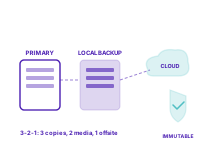
The 3-2-1 rule has been the gold standard for 20 years: three copies of your data, two on different media, one offsite. Most SMEs are at 1-1-1: one backup, on the same kind of storage, in the same building. That’s not a backup architecture. That’s a hope.
We build proper 3-2-1: production data on your servers (copy 1), local backup on different storage in your office (copy 2), and immutable cloud backup in Australian-hosted storage (copy 3). Cloud backup is air-gapped from your network, ransomware can’t reach it even if it owns every machine in your office.
Backups That Actually Restore
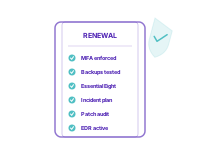
Every MSP runs backups. Few test that they actually restore. The first time you find out your backups don’t work shouldn’t be when you need them. We run quarterly restore tests against real data, prove the restored systems boot, prove data integrity, and document the results. When it’s time to renew cyber insurance or pass an audit, you have the evidence.
Annual full disaster-recovery simulations go further: restoring your entire production environment to isolated infrastructure, validating recovery procedures end-to-end, and timing actual RTO. Most clients are surprised how close their real recovery time is to target (or how far off, and where to fix it).
Ransomware-Proof By Design
The ransomware playbook in 2026 is industrialised: encrypt production, then go hunting for the backups. Variants like LockBit specifically target backup software, network shares, and any backup storage they can reach over SMB.
We architect against this. Backup destinations are isolated from the production network. Cloud backups use immutable storage that no admin account can delete from for the retention period. Backup credentials are separate from domain admin accounts. We’ve never had a client lose backups to ransomware, and we audit the architecture quarterly to keep it that way.
Benefits of Managed Backup & DR with TechAssist
- Tested Recovery: Quarterly restore tests with documented results. You know it works before you need it.
- Ransomware-Resilient: Immutable cloud backups that ransomware can’t encrypt or delete.
- Compliance-Ready: Evidence packages for cyber insurance, audits, and due diligence.
- Documented DR Plan: Written plan with roles, RTO/RPO, escalation. Not just a backup tool.
- Australian Storage: Backup data stays in Australian regions. Data sovereignty maintained.
- Integrated Service: Part of managed IT, not a separate product to manage. Managed IT details →
Why Melbourne SMEs Choose TechAssist for Backup & DR
- We test restores: Quarterly, on real data, with documented results. Most MSPs don’t.
- Over a decade of SME backup experience across construction, manufacturing, logistics, law firms, mining, and professional services.
- 3-2-1 done right: Three copies, two media, one offsite. Immutable cloud destination.
- Insurance-ready evidence: The exact documentation cyber insurers ask for at renewal.
- Australian data residency: Backups stay in Australian jurisdictions where Privacy Act and industry rules require.
- Named clients trust us, StorageX, John Curtin & Associates, Magnium Australia.
Frequently asked questions
What does a proper backup look like?
Immutable, so it cannot be altered or deleted by an attacker who reaches your network. Geographically separate from the systems it protects. Covering Microsoft 365 as well as servers and workstations. And tested, because a backup nobody has restored from is an assumption, not a protection.
How often do you test restores?
Restore testing is part of the managed backup service rather than something that happens after an incident. The test that matters is a full restore of a real system to a working state, not a report saying the job completed.
Does Microsoft back up our Microsoft 365 data?
Not in the sense most businesses mean. Microsoft protects the platform and provides limited retention windows. Recovering your data after accidental deletion, a departing employee, or ransomware is your responsibility under the shared responsibility model, which is why we deploy separate backup for Microsoft 365.
What is the difference between backup and disaster recovery?
Backup is a copy of your data. Disaster recovery is the plan and the capability to get the business operating again, which includes the order things come back in, who does what, and how long each step takes. A business with good backups and no recovery plan still has a long outage.
How quickly can you restore after ransomware?
That depends on what was encrypted, how far back the clean restore point is, and whether the environment has to be rebuilt before data goes back. Recovery objectives should be agreed in advance and written down, because the answer during an incident is too late to negotiate.
Ready to Make IT Your
Competitive Advantage?
Book a free consultation with our team. No pressure, no jargon, just a clear-eyed look at where you stand and what's possible.