Per-user fixed monthly suits most Australian SMEs with 15-150 staff and standard office setups. Per-device works for shops heavy on servers, kiosks or shared workstations. Hourly retainers fit businesses with internal IT who only need overflow help. Hybrid models suit complex environments mixing cloud, on-prem and field staff.
If you’ve put three Melbourne MSPs in front of your finance team, you’ve probably had three completely different quote structures land in your inbox. One charges $135 per user per month. Another quotes $89 per device. A third wants a $4,500 monthly retainer plus T&M on anything outside scope. They’re all “managed IT”, but the way they bill changes everything about how the relationship actually plays out.
This post is about managed it pricing models as a structural choice, not the totals. If you want the dollar ranges Melbourne MSPs typically charge in 2026, read our Melbourne managed IT pricing breakdown first. What follows is about which billing mechanism actually suits your business, and why the wrong structure leaves you either overpaying or fighting your MSP every month over what’s in-scope.
Why the billing model matters more than the headline price
Two MSPs can quote the same monthly total and deliver wildly different experiences. The billing model dictates three things that compound over the life of the contract: what counts as “included,” how the MSP’s incentives line up with yours, and how predictable your IT line item is when you grow, shrink or change.
I’ve seen a 40-staff accounting firm in Hawthorn switch from per-device to per-user and watch their monthly bill drop 18%, not because the new provider was cheaper, but because they had a lot of part-time staff sharing workstations. The per-device model was counting hardware their team barely used. Conversely, a manufacturing client in Dandenong South tried to move from per-device to per-user and the numbers blew out: they had two PLCs, six shop-floor terminals and a server room per staff member, and per-user pricing assumed a desk-and-laptop world that didn’t exist in their business.
The model has to match the shape of your environment. Here’s how each one actually works.
Model 1: Per-user fixed monthly
You pay a flat fee per active staff member each month. That fee covers everything the MSP defines as standard support: typically one or two devices per user, mobile device management, email, identity, common SaaS apps, security stack, helpdesk, after-hours coverage and patching.
How it actually works
The MSP audits your headcount monthly. New starter joins on the 14th? You’re billed pro-rata. Someone leaves? Their licence is decommissioned and they come off the next invoice. The price is fixed per person regardless of how many tickets they raise, which is the whole point.
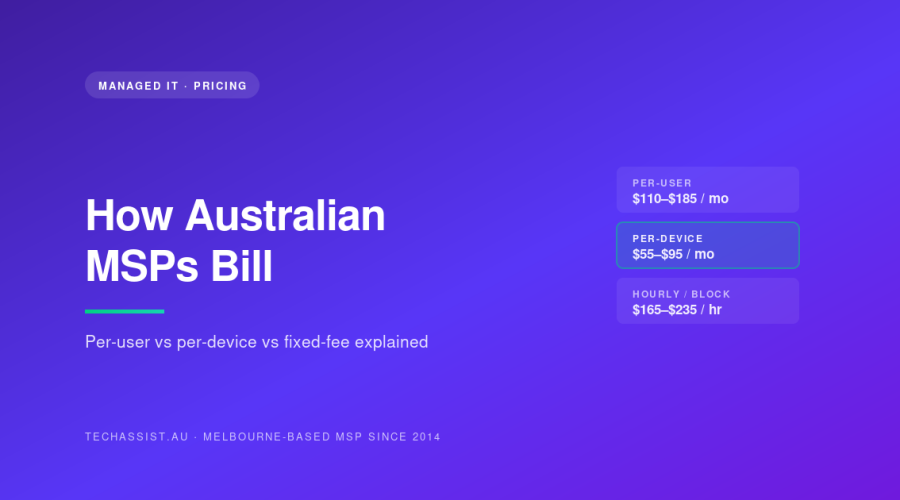
Most Australian per-user agreements sit between $110 and $185 per user per month in 2026, depending on stack inclusions and SLA. The number on the proposal isn’t really negotiable, what you negotiate is what’s inside the bundle.
What’s typically included
- Helpdesk during business hours and after-hours P1 response
- Endpoint security (EDR), patching, monitoring
- Microsoft 365 or Google Workspace administration
- One or two endpoints per user (laptop + phone, or desktop + laptop)
- Identity and access management
- Backup of cloud data (sometimes excluded: check the SOW)
- Onboarding and offboarding of staff
Who it suits
Knowledge-work businesses with 15-150 staff, mostly cloud-based, fairly uniform setups. Professional services, agencies, advisory firms, allied health, NFPs, small wholesalers. If your people each have a laptop and a phone and they live in Microsoft 365 or Google Workspace, per-user is almost always the cleanest fit.
Where it fails
It falls apart when your headcount understates your IT footprint. A 25-staff manufacturer with 80 devices on the floor will get murdered on per-user pricing: or, more accurately, the MSP will quietly add a “per-device surcharge” for non-user devices, which makes the whole thing less transparent than per-device would have been. Same problem for retail with POS, hospitality with kiosks, or logistics with handheld scanners.
TechAssist runs per-user fixed monthly as our standard model. We chose it because it makes our incentives line up with the client’s: we get the same revenue whether your staff raise three tickets a month or thirty, so we’re motivated to fix root causes, not to keep the lights flickering. It also means finance teams know exactly what next month looks like.
Model 2: Per-device
You pay a fee per managed endpoint: server, workstation, laptop, sometimes mobile. Each device class usually has its own rate. Servers might be $250-$450/month, workstations $55-$95, laptops similar, mobiles $15-$25.
How it actually works
The MSP runs discovery, builds an asset register, agrees the per-device rates with you and then invoices monthly based on what’s under management. You add a device, it gets onboarded and added to the bill. You retire a device, it comes off. Users are basically invisible to the billing, the MSP doesn’t care if one person uses ten laptops or ten people share one.
What’s typically included
- Monitoring and patching on each managed device
- Endpoint security on each device
- Backup and recovery (usually charged separately for servers)
- Helpdesk for issues on managed devices
- Hardware lifecycle management
What’s usually NOT included on a strict per-device model: user support that isn’t device-specific (password resets, M365 admin, identity issues), project work, and after-hours unless explicitly bolted on.
Who it suits
Asset-heavy businesses where devices outnumber users: manufacturing, warehousing, retail chains, hospitality groups, healthcare with diagnostic kit, logistics. Also a reasonable fit for small businesses with very few staff but a couple of servers, where per-user feels like you’re paying for nothing.
Where it fails
Two places. First, user-centric problems don’t fit cleanly, a staff member who can’t log in isn’t a device problem, but they’ll still ring the helpdesk. Second, the asset register becomes a fight. Is the meeting room TV a managed device? The receptionist’s iPad? The MD’s home laptop? Per-device billing pushes both sides to argue about scope every time something new appears.
Model 3: Hourly retainer or block hours
You pre-purchase a block of engineering hours each month, say 20, 40 or 80 hours at a negotiated rate, and burn them down on whatever you need. Unused hours sometimes roll over (rarely past 30 days), sometimes expire.
How it actually works
The MSP quotes a blended hourly rate, usually $165-$235/hour in Melbourne in 2026 depending on seniority and after-hours loading. You commit to a minimum monthly spend. Tickets are logged with time, you get a monthly report showing burn-down, and you top up when the block runs low.
What’s typically included
Nothing is “included” in the per-user/per-device sense. You pay for what you use. Monitoring and security tooling are usually billed separately as monthly licence costs, then engineering time is drawn from your hour block.
Who it suits
Businesses with capable internal IT who only need overflow, escalation or specialist help. Government departments with their own IT but needing M365 specialist hours. Larger SMEs with a one-person internal IT lead who needs backup. Also fits businesses doing a project-heavy phase, migration, fit-out of a new office, where work is bursty rather than steady. This is the model most often seen in our co-managed IT engagements, where there’s an internal IT lead and we plug in capacity.
Where it fails
It penalises proactive work. If every hour the MSP spends gets billed, they have a perverse incentive to be reactive, and you have a perverse incentive to avoid calling them, which means small problems become big ones. It’s also brutal during incidents: a six-hour outage can chew through a month’s block in one afternoon. And it makes budgeting harder, not easier, because your spend tracks your bad weeks.
Model 4: Hybrid
A fixed per-user or per-device base for “everything routine” plus an hourly rate for project work, after-hours emergencies, or anything outside a defined scope. Probably the most common model in Australia in 2026, even when MSPs market themselves as pure per-user or pure per-device.
How it actually works
The contract defines an inclusion list, the routine stuff covered by the fixed fee, and an exclusion list, which is everything billable at T&M. The cleaner the inclusion list, the more predictable your bill. The fuzzier it is, the more arguments you’ll have.
What’s typically included in the fixed portion
- Helpdesk, monitoring, patching, security stack: same as per-user
- Routine admin (user adds/removes, password resets, standard config changes)
- Standard reporting and reviews
And billed hourly on top:
- Projects (migrations, new site fit-outs, hardware refreshes)
- After-hours work outside SLA
- Anything the SOW classifies as out-of-scope
Who it suits
Most growing SMEs eventually end up here, because pure per-user can’t absorb major project work without inflating the per-seat rate, and pure hourly is too volatile. A 60-staff law firm in South Yarra running a fixed per-user fee for day-to-day but commissioning us hourly for a Practice Evolve migration is a textbook hybrid scenario.
Where it fails
Scope creep on both sides. If the inclusion list isn’t tight, the MSP starts pushing routine work into project hours. If it’s too tight, the client feels nickel-and-dimed. The hybrid model is only as good as the SOW that defines it: read ours under our pricing and SLA terms before you sign anything from anyone.
The four models, side by side
| Model | What works | Who it suits | Where it fails | Typical AUD context (2026) |
|---|---|---|---|---|
| Per-user fixed monthly | Predictable spend, aligns MSP incentives, easy to scale with headcount | Knowledge-work SMEs, 15-150 staff, cloud-first, uniform setups | Device-heavy environments; non-user assets distort the model | $110-$185 per user per month |
| Per-device | Accurate for asset-heavy businesses, simple inventory-driven billing | Manufacturing, retail, hospitality, logistics, healthcare with kit | User-centric tickets don’t fit; scope fights over what counts as “managed” | $55-$95 workstation, $250-$450 server, per month |
| Hourly retainer / block hours | Pay only for what you use, flexible for variable workloads | Businesses with internal IT needing overflow; project-heavy phases | Penalises proactive work; volatile during incidents; poor for budgeting | $165-$235/hour blended; 20-80 hour blocks common |
| Hybrid (fixed + T&M) | Routine work predictable, projects funded properly | Growing SMEs, complex environments, businesses doing migrations | Only as good as the SOW; scope-creep risk on both sides | Base fixed fee + $185-$235/hour for out-of-scope work |
The honest version: why TechAssist runs per-user fixed
We’ve used three of these four models across the business since we were founded in 2014. We settled on per-user fixed monthly as our standard because of incentive alignment more than anything else. With 13 Melbourne-employed staff and a NOC with 24/7 on-call and emergency support in Tecoma, we carry the cost of being available whether or not your staff need us in any given month. Per-user fixed means we’re paid the same whether your team raises five tickets or fifty. So we spend our energy fixing root causes, building reliable platforms and reducing the ticket rate over time, because that’s how we stay profitable.
The other reason: it’s the model SMEs find easiest to justify to the board. “We pay $X per head per month, full stop” is a clean line item. It scales when you hire. It shrinks when you don’t. And it doesn’t generate surprise invoices that have your CFO ringing us in week three of the month.
It’s not the right model for everyone. We’ve recommended per-device or hybrid arrangements to manufacturing prospects where per-user would have understated their footprint and resulted in either a padded per-seat number or constant out-of-scope billing. The right billing model is the one that matches your environment honestly, and we’d rather refer that work than misprice it.
How to pressure-test an MSP’s quote
Before you sign anything, ask these questions in writing:
- What’s the exact inclusion list? Not the brochure version: the SOW version.
- What triggers an out-of-scope billable hour? Give me three examples.
- What’s the after-hours and weekend loading on hourly rates?
- How is a “user” or “device” defined? When does a contractor count? A shared workstation?
- What happens to the bill if headcount drops 20% in a quarter?
- What’s the SLA for P1, P2 and P3? What’s the credit if you miss it? (Ours sits under 15 minutes for P1: see our SLA detail.)
- What’s the minimum contract term, and what’s the exit clause?
An MSP that answers all of these clearly is operating an honest pricing model. One that gets vague on any of them is going to be vague on the invoice too.
Matching the model to your business
A few quick patterns we see in Melbourne SMEs:
- Professional services (legal, accounting, consulting), 20-100 staff: per-user, almost always.
- Allied health, NFP, education admin: per-user, with care taken on shared devices in clinics or classrooms.
- Manufacturing and warehousing: per-device or hybrid, with explicit server-class pricing.
- Retail and hospitality groups: per-device for POS-heavy sites, per-user for head office staff.
- Construction and trades with field staff: per-user works if everyone has a phone and laptop; hybrid if you’ve got site-based servers or specialty kit.
- Businesses with internal IT (1-3 person team): hourly block or co-managed arrangement, with the MSP handling escalation, security and after-hours. Worth reading our breakdown of co-managed IT pricing for Australian SMEs if this is you.
If you’re somewhere between two patterns, which is most growing businesses, hybrid is usually the right answer, with a tight SOW.
FAQ
Is per-user pricing always more expensive than per-device?
No. For knowledge-work businesses with one or two devices per user, per-user is usually cheaper because the MSP is sizing the contract to your actual support load, humans raise tickets, devices generally don’t. For asset-heavy businesses it can be more expensive, because you’ll either pay a higher per-seat rate or end up on a hidden hybrid. The right comparison is total cost over 12 months, not the headline rate.
Can I negotiate the per-user rate down?
A bit, but not much. The real negotiation is what’s inside the bundle. Push for explicit inclusions on after-hours, backup, M365 administration, security stack and onboarding/offboarding. Those clauses are worth more than $5-10 off the per-user fee.
What about pure break-fix (call us when something breaks)?
We don’t offer it and most credible MSPs won’t either. The economics don’t work for either side: you pay too much per incident, the MSP can’t invest in proactive monitoring, and security cover is patchy. If your IT spend is genuinely that small, you probably need a one-person IT contractor on retainer, not a full MSP.
If I have 200 staff but only 50 use computers regularly, do I pay for all 200?
You pay for active users: people who have an identity, a mailbox or a managed device. Shop-floor workers without a login don’t count. We define this in the SOW so there’s no ambiguity at month-end.
How often can I change billing models with my MSP?
Usually at contract renewal: most agreements run 12 or 24 months. Mid-term changes happen but require a fresh SOW. If your environment has changed materially (acquisition, new site, restructure), most MSPs will reopen the model rather than force you through to renewal on the wrong terms.
Where to next
If you want the dollar ranges to go with this structural picture, read our Melbourne managed IT pricing post for 2026. If you’ve got internal IT and you’re weighing co-managed options, the co-managed pricing breakdown is the right next read.
If you’d rather just have someone look at your environment and tell you which model actually fits, our managed IT team runs a 30-minute scoping call at no cost: we’ll be honest if per-user isn’t right for you. Get in touch or call us on 1300 028 324.